How to Identify and Prevent Uneven Workload Distribution in Scale-Out NAS Clusters?

A Scale out nas architecture offers immense flexibility, allowing organizations to expand storage capacity and performance seamlessly. However, expanding storage by simply adding nodes does not automatically guarantee optimal performance across the cluster. Uneven workload distribution can severely cripple storage efficiency, creating performance bottlenecks that impact critical business applications. Storage administrators must actively monitor traffic and node health to prevent resource exhaustion.
This technical guide provides a systematic approach to identifying workload imbalances, implementing preventative measures, and securing your infrastructure against secondary threats. By maintaining optimal distribution, organizations can maximize their hardware investments and ensure consistent data availability.

The Mechanics of Cluster Workloads
To understand workload distribution, administrators must examine how client requests interact with the storage cluster. When applications or users request data, they connect to a specific node within the storage environment. In a perfectly optimized environment, these connections are distributed evenly across all available hardware resources. Every node processes an equal share of network traffic, disk input/output operations, and CPU utilization.
Unfortunately, standard network configurations often fail to maintain this symmetry. Static IP assignments or poorly configured Domain Name System (DNS) settings frequently direct a disproportionate number of clients to a single point of entry. When this happens, a specific node becomes a hotspot. This single node struggles to process the massive influx of requests while other nodes in the same environment remain idle.
Capacity imbalances represent another common challenge in scale-out NAS environments. As administrators add new nodes to the cluster, legacy data often remains on the older hardware. Without an automated process to redistribute files, the older hardware handles the bulk of the read requests for existing data.
Identifying Performance and Capacity Imbalances
Recognizing an uneven workload requires strict attention to system telemetry and performance metrics. A healthy Nas System relies on symmetric data distribution and predictable latency. Administrators should monitor several key indicators to identify potential hotspots before they cause systemic failures.
Network and CPU Saturation
The most immediate symptom of a workload imbalance is localized resource saturation. Network monitoring tools will show a high concentration of incoming and outgoing traffic routed through a single network interface card. Consequently, the CPU utilization on that specific node will spike to near maximum capacity. Clients connecting to this saturated node will experience severe latency and connection timeouts, even though the overall cluster possesses plenty of available computing power.
Storage Capacity Skew
Capacity skew occurs when physical disks within certain nodes reach high utilization thresholds while disks in newly provisioned nodes remain mostly empty. File systems that do not automatically stripe data across new hardware inevitably create these capacity traps. Storage administrators must routinely review capacity utilization reports per node, rather than relying solely on cluster-wide storage averages.
The Hidden Threat: NAS Appliances Ransomware
Uneven workloads create significant security blind spots that malicious actors can exploit. When performance monitoring tools are constantly saturated with alert fatigue from hot nodes and bottlenecked connections, malicious encryption processes often go unnoticed. Threat actors specifically design NAS Appliances Ransomware to target network-attached storage architectures, aiming to encrypt vast amounts of corporate data simultaneously.
If your Scale out nas is already experiencing erratic input/output behavior due to poor load balancing, detecting a security breach becomes incredibly difficult. Ransomware encryption generates massive amounts of read and write operations. In a poorly managed cluster, administrators might misinterpret this malicious activity as standard application traffic or a recurring bottleneck issue.
Conversely, a well-balanced Nas System provides a reliable baseline of normal network activity. When workloads are evenly distributed, sudden localized spikes in file modifications trigger immediate security alerts. Maintaining symmetric workloads makes it much easier to detect the anomalous input/output patterns generated by NAS Appliances Ransomware attacks. Therefore, load balancing is not strictly a performance optimization task; it is a fundamental component of your data security posture.
Strategies to Prevent Workload Imbalances
Correcting and preventing uneven workloads requires a combination of network intelligence, automated data management, and strict access policies. Administrators must implement systemic changes to how clients connect to the storage infrastructure.
Implement Dynamic Client Routing
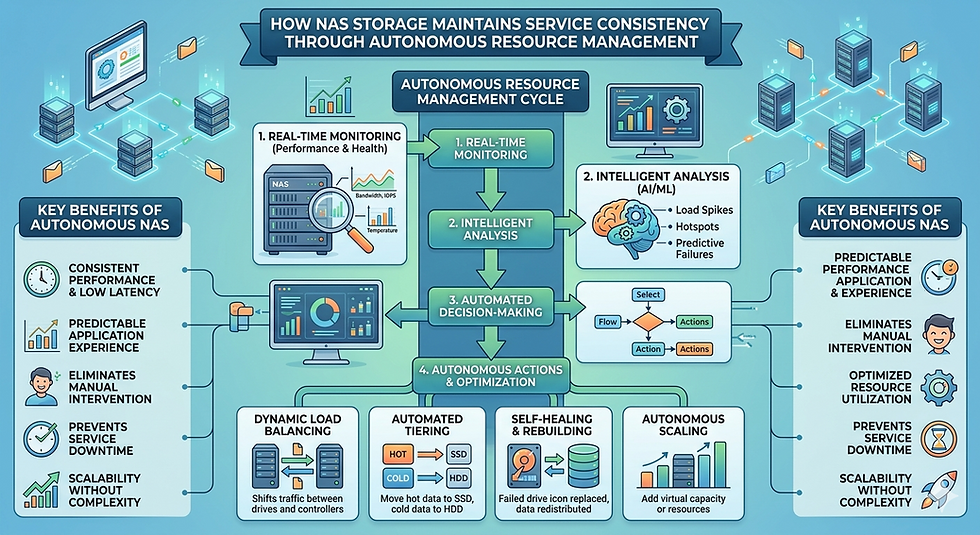
Relying on traditional DNS round-robin protocols is insufficient for modern enterprise storage. DNS round-robin merely alternates IP addresses without considering the current load on the receiving node. Instead, implement intelligent load balancing solutions that actively query the Scale out nas for real-time performance metrics. These advanced balancers route new client connections to the node with the lowest current CPU utilization and highest available network bandwidth.
Automate Data Rebalancing
To address capacity imbalances, enable automated data rebalancing features within your storage operating system. When new nodes join the cluster, the system should automatically initiate a background process to migrate a portion of existing data to the new hardware. To prevent this process from impacting production workloads, administrators should schedule rebalancing tasks during off-peak hours and apply quality-of-service limits to the migration bandwidth.
Enforce Connection Limits
Certain high-throughput applications, such as video rendering farms or massive database backups, can monopolize a node regardless of the load balancer's routing decisions. To mitigate this, enforce strict connection limits and bandwidth quotas on a per-client or per-subnet basis. By restricting the maximum throughput a single client can pull from the Nas System, you protect the hardware from localized resource exhaustion.
Securing Your Infrastructure Against Modern Threats
Beyond optimizing performance, administrators must integrate threat detection mechanisms directly at the storage layer. Standard perimeter defenses often fail to stop lateral movement once a threat actor breaches the internal network. Because network-attached storage holds the organization's most valuable assets, it requires dedicated protection.
Deploying file screening and behavior-based analytics on the storage nodes helps mitigate the threat of NAS Appliances Ransomware. These security tools monitor file modification rates and user access patterns in real time. If a compromised user account begins rapidly encrypting files or changing file extensions, the security software can instantly sever the user's connection and isolate the affected node. By combining symmetric workload distribution with behavior-based threat detection, organizations can maintain high performance while securing their data against sophisticated attacks.
Achieving Long-Term Stability in Storage Environments
Managing a high-performance Scale out nas requires proactive monitoring and intelligent network design. Administrators cannot rely on default configurations to distribute connections efficiently. By implementing dynamic load balancing, automating background data migrations, and monitoring node-level telemetry, organizations can eliminate hotspots and reduce latency.
Furthermore, recognizing the relationship between storage performance and data security is critical. An optimized, well-balanced Nas System provides the baseline visibility necessary to detect and stop NAS Appliances Ransomware before it causes catastrophic data loss. Treat workload distribution as a continuous operational requirement, ensuring your storage infrastructure remains resilient, efficient, and secure.


Comments