Optimizing Network Storage Solutions for High-Definition Video Streaming and Real-Time Data Analytics in Enterprises
- Mary J. Williams
- Mar 10
- 5 min read

Enterprise environments generate and consume massive volumes of data every second. Two of the most resource-intensive workloads are high-definition video streaming and real-time data analytics. Both applications place severe demands on IT infrastructure, requiring high throughput, minimal latency, and continuous availability. Standard storage configurations simply cannot handle the simultaneous read and write requests generated by these tasks.
To prevent bottlenecks and ensure smooth operations, IT architects must implement specialized Network Storage Solutions. High-definition video requires sustained sequential read speeds to prevent buffering. Conversely, real-time data analytics demands extremely high Input/Output Operations Per Second (IOPS) to process random data packets across multiple databases. Balancing these conflicting requirements requires a systematic approach to hardware selection and network configuration.
This article provides a technical framework for upgrading your storage infrastructure. You will learn the specific performance metrics required for video streaming and analytics, how to configure a NAS System for optimal data flow, and the best practices for maintaining data integrity under heavy enterprise workloads.

The Demands of High-Definition Video Streaming
High-definition and 4K video files are exceptionally large. Streaming these files to dozens or hundreds of concurrent users requires a storage architecture optimized for continuous data delivery.
Throughput and Latency Requirements
Video streaming relies heavily on sustained throughput. The storage array must deliver data packets at a constant rate. Any drop in throughput causes playback interruptions or frame drops on the client side. Network latency must remain below 10 milliseconds. High latency delays the initial video load and disrupts the synchronization of audio and video tracks. To achieve these metrics, administrators must configure storage arrays with high-bandwidth network interfaces, such as 10 Gigabit Ethernet (10GbE) or faster.
Sequential Read Performance
Unlike database applications, video files are typically written once and read multiple times in a sequential pattern. Optimizing Network Storage Solutions for sequential reads involves configuring RAID arrays with appropriate stripe sizes. A larger stripe size allows the system to read large chunks of video data across multiple disks simultaneously. This configuration maximizes disk spindle utilization and directly increases the overall throughput available to the streaming server.
Architecting for Real-Time Data Analytics
Data analytics workloads operate fundamentally differently from video streaming. Instead of reading large, contiguous blocks of data, analytics engines constantly read and write tiny fragments of data scattered across the storage array.
IOPS and Random Access Speeds
Real-time analytics platforms ingest streams of data from IoT sensors, financial transaction logs, and user behavior tracking. The storage system must process millions of random read and write operations concurrently. Therefore, the primary performance metric for analytics is IOPS. Hard disk drives (HDDs) suffer from mechanical latency and cannot deliver the necessary IOPS for real-time processing. Enterprise architects must utilize solid-state drives (SSDs) utilizing the NVMe protocol to provide the microsecond response times required by analytics engines.
Tiered Storage and Caching
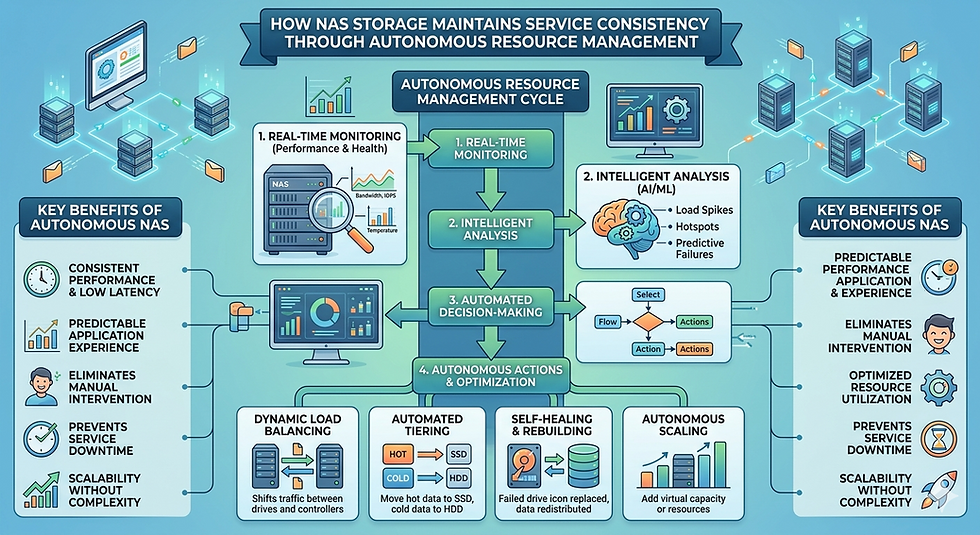
Placing all enterprise data on NVMe storage is often prohibitively expensive. Administrators solve this problem by implementing tiered storage architectures. Frequently accessed data resides on the highest-performing flash storage tier. As data ages and becomes less critical, the system automatically migrates it to high-capacity, lower-cost HDD tiers. Additionally, implementing an aggressive RAM-based caching layer within the storage controller absorbs sudden spikes in write activity, preventing the underlying disks from becoming a performance bottleneck.
Selecting and Configuring a NAS System
Network-Attached Storage provides a centralized, file-level data repository accessible to multiple servers and client machines. Configuring a NAS System correctly is critical for balancing the diverse workloads of video streaming and data analytics.
Hardware Considerations for a NAS System
When deploying a NAS System for demanding enterprise tasks, hardware specifications dictate the upper limits of performance. The system requires a multi-core processor to handle the computational overhead of network protocols, encryption, and RAID parity calculations. Sufficient system memory is equally critical. The NAS operating system uses available RAM to cache file directories and frequently accessed data blocks. Insufficient memory forces the system to retrieve data from the physical disks, drastically increasing latency.
Network Infrastructure Integration
A high-performance NAS is useless if the surrounding network infrastructure restricts data flow. Administrators must implement link aggregation (LACP) to combine multiple physical network ports into a single logical connection. This setup increases total available bandwidth and provides failover redundancy. Furthermore, enabling Jumbo Frames on both the NAS and the network switches reduces the packet processing overhead on the CPU, which is highly beneficial for the large sequential transfers associated with video streaming.
Best Practices for Network Storage Solutions
Deploying the hardware is only the first phase of an enterprise storage upgrade. Continuous optimization and strict adherence to administrative best practices ensure long-term reliability.
Implementing Quality of Service (QoS)
When video streaming and data analytics share the same Network Storage Solutions, resource contention becomes a significant risk. Quality of Service (QoS) protocols allow administrators to allocate specific bandwidth and IOPS limits to different applications. By configuring QoS rules, you can ensure that a sudden surge in analytics processing does not starve the video streaming server of the bandwidth it needs to deliver smooth playback.
Data Redundancy and Fault Tolerance
High-performance environments place immense stress on physical storage media. Drive failures are a mathematical certainty. Enterprises must configure RAID 6 or RAID 10 arrays to tolerate simultaneous drive failures without losing data. Furthermore, administrators must establish synchronous replication to an off-site disaster recovery facility. This guarantees that real-time analytics data remains secure and available even in the event of a catastrophic hardware failure at the primary data center.
Frequently Asked Questions
What is the difference between IOPS and throughput?
IOPS measures how many individual read or write operations a storage device can perform in one second. It is critical for database and analytics workloads. Throughput measures the total volume of data transferred per second (e.g., Megabytes per second). Throughput is the primary metric for large file transfers and video streaming.
Can a single storage array handle both video and analytics efficiently?
Yes, modern unified storage arrays can handle both. They achieve this by utilizing hybrid storage pools, combining SSDs for IOPS-heavy analytics and HDDs for high-capacity video storage, managed by intelligent tiering software and strict QoS policies.
Why is NVMe superior to SATA for enterprise analytics?
NVMe communicates directly with the system CPU via the PCIe bus, bypassing the legacy AHCI controller used by SATA drives. This direct connection drastically reduces latency and allows for thousands of parallel data queues, making it vastly superior for processing the random data access patterns of real-time analytics.
Next Steps for Upgrading Enterprise Data Infrastructure
Optimizing your storage infrastructure requires a precise understanding of your specific application workloads. Start by auditing your current network traffic to identify latency bottlenecks and disk utilization rates. Evaluate your existing hardware to determine if upgrading your caching layers or migrating to an all-flash NAS System aligns with your performance targets. Engage with your hardware vendors to test localized workloads on evaluation units before committing to a full-scale deployment.


Comments