What Is NAS Storage and How Does It Handle Concurrent Backup and Restore Workloads Without Performance Loss?

Data management infrastructure requires systems capable of handling massive throughput without compromising operational efficiency. Enterprise environments frequently face the challenge of executing simultaneous data operations. Specifically, running backup processes while simultaneously restoring data often leads to severe network bottlenecks and unacceptable latency.
Network-Attached Storage systems provide a robust architecture designed to mitigate these exact bottlenecks. By utilizing distributed file systems and advanced node clustering, modern storage solutions maintain high availability and consistent speeds even under heavy, overlapping input/output (I/O) demands. This article explains the underlying mechanics of these storage environments and how specific architectures prevent performance degradation during concurrent backup and restore operations.

What is NAS Storage?
To understand how data bottlenecks are resolved, one must first ask: what is NAS storage? Network-Attached Storage (NAS) is a dedicated file storage architecture that enables multiple users and heterogeneous client devices to retrieve data from a centralized disk capacity. Unlike Storage Area Networks (SAN) which provide block-level storage, NAS operates at the file level. Users access files over a standard Ethernet connection utilizing protocols such as Network File System (NFS) or Server Message Block (SMB).
A standard NAS device consists of an engine that processes the network protocols and physical disk arrays that store the data. In basic configurations, the processing power and network bandwidth are fixed. If an enterprise attempts to run heavy I/O workloads—such as a system-wide backup—on a basic NAS unit, the CPU and network interfaces quickly become saturated. This saturation prevents users from executing other critical functions, such as data restoration, without experiencing severe delays.
The Bottleneck of Concurrent Workloads
Backup and restore operations are inherently resource-intensive. A backup requires the system to read vast amounts of data, compress or deduplicate it, and write it to a designated target. A restore operation reverses this process, requiring the system to locate specific data blocks, reassemble them, and write them back to primary storage.
When these operations occur simultaneously on a traditional, single-controller storage system, the system encounters I/O contention. The controller must divide its processing cycles and RAM between reading data for the backup and writing data for the restore. Furthermore, the physical disks reach their maximum Input/Output Operations Per Second (IOPS). The mechanical limitations of spinning disks, or even the bandwidth limits of a single network interface, create a rigid ceiling on throughput. Performance loss becomes unavoidable.
Solving I/O Contention with Scale Out NAS Storage
To address the limitations of traditional single-controller architectures, enterprises utilize scale out NAS storage. Traditional storage scales up by adding more disk drives to a single controller, which eventually reaches a processing limit. Scale out NAS storage scales out by linking multiple storage nodes together to create a single, unified cluster.
Each node in a scale out NAS storage cluster contains its own processing power (CPU), memory (RAM), network interfaces, and storage capacity. When a new node is added to the cluster, the system linearly increases its overall processing capability and network bandwidth. A distributed file system manages the cluster, presenting the disparate nodes to the end-user as a single, contiguous namespace.
Distributed Parallel Processing
The primary mechanism that allows scale out systems to handle concurrent workloads is parallel processing. When a backup operation initiates, the distributed file system divides the workload across all available nodes in the cluster. Because no single controller bears the entire burden, the system can process the data stream much faster.
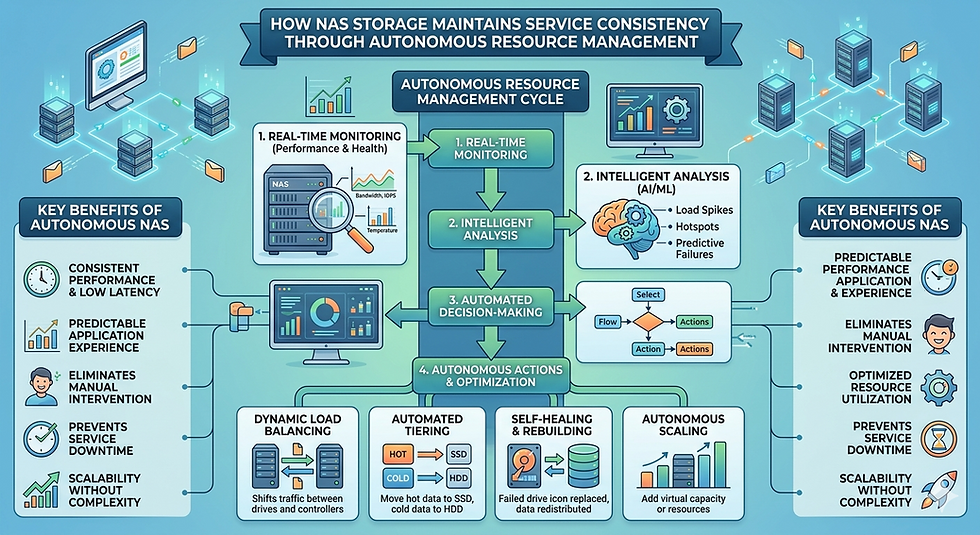
If a restore operation begins while the backup is running, the cluster's intelligent load balancer intercepts the request. The system dynamically allocates available CPU and memory resources from across the cluster to manage the incoming restore request. The backup reads data from one set of nodes, while the restore writes data through parallel network paths using different nodes or available processing cycles.
Intelligent Caching and Tiering
Modern storage clusters, especially those built on scale out NAS storage architectures, implement advanced caching algorithms. High-speed NVMe solid-state drives (SSDs) act as a read/write cache in front of larger, slower hard disk drives (HDDs). During concurrent workloads, the SSD cache absorbs the immediate I/O impact.
The restore operation writes data directly to the high-speed cache, allowing the operation to complete from the user's perspective with minimal latency. Simultaneously, the backup operation reads sequentially from the underlying HDDs. The system logic separates the random I/O of the restore from the sequential I/O of the backup, completely bypassing the disk contention that plagues legacy systems.
Optimizing Enterprise Data Management
Implementing a storage architecture capable of handling heavy, overlapping workloads requires careful evaluation of your organization's specific I/O requirements. Standardizing on an architecture that distributes processing and networking loads prevents the latency spikes associated with traditional single-controller setups.
Review your current backup windows and calculate the IOPS required to restore your largest critical dataset. If your existing infrastructure forces you to schedule operations sequentially to avoid network saturation, transitioning to a distributed node cluster will immediately improve operational resilience. Evaluate vendor specifications for parallel processing capabilities and intelligent caching algorithms to ensure your next infrastructure upgrade meets the demands of concurrent enterprise workloads.


Comments