The NAS Solutions Expansion Paradox: Why Adding Capacity Can Reduce Performance And How to Prevent It?
- Mary J. Williams
- Feb 17
- 5 min read

Network Attached Storage (NAS) has long been the workhorse of enterprise data management. It’s reliable, accessible, and traditionally, easy to scale. If you run out of space, you simply add more drives or another shelf of storage. Problem solved, right?
Not always. In fact, many organizations encounter a frustrating phenomenon known as the "Expansion Paradox." This occurs when adding more capacity to a NAS environment actually degrades performance instead of maintaining or improving it. For IT leaders relying on NAS solutions to support mission-critical applications, this counterintuitive result can lead to latency spikes, user complaints, and stalled workflows.
Understanding why this happens—and how to prevent it—is essential for modernizing your storage infrastructure without sacrificing speed for space.

The Mechanics of the Expansion Paradox
To understand why adding capacity can slow things down, we have to look at how traditional NAS architectures handle data.
The Metadata Bottleneck
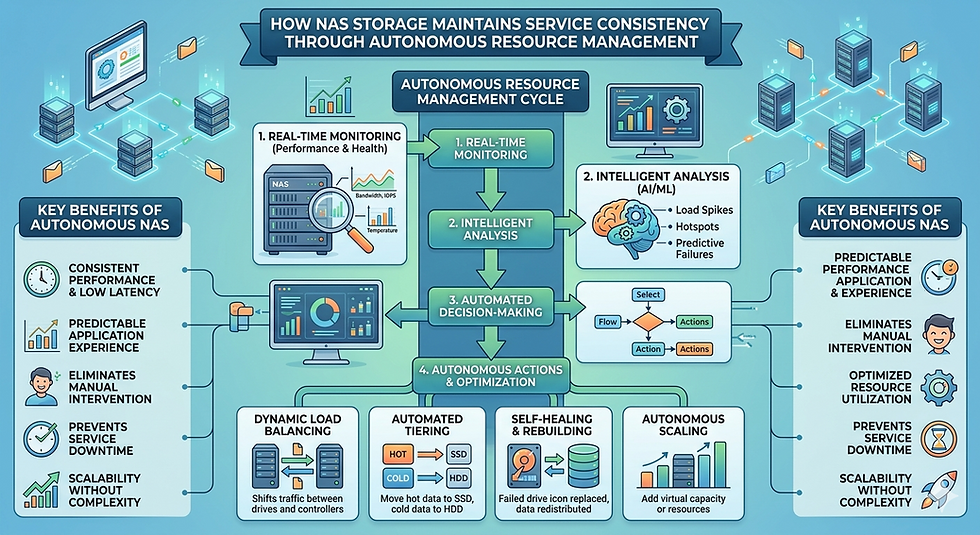
In a standard scale-up NAS architecture, the storage controller manages both the data (the actual files) and the metadata (information about where those files are stored, who owns them, and when they were accessed). As you add more capacity, you are inevitably adding more files. Addressing this challenge is a key priority in modern NAS solutions, where architectures are designed to distribute metadata processing across multiple nodes to prevent controller overload and maintain consistent performance at scale.
Every time a user or application requests a file, the controller must look up the metadata. When you expand capacity significantly, the metadata tables grow larger. Eventually, the controller’s processing power and memory become saturated just trying to manage the file system's overhead. The drives themselves might have plenty of speed, but the brain of the operation—the controller—is overwhelmed.
Rebalancing Overhead
When you add new drives to an existing RAID group or storage pool, the system often needs to "rebalance" data to ensure it is spread evenly across all drives. This process consumes significant system resources. While the rebalancing is occurring—which can take days or even weeks for large datasets—performance for users can plummet.
The "Long Tail" of Latency
As Network Attached Storage systems fill up, file fragmentation often increases. The read/write heads on mechanical hard drives (HDDs) have to work harder to seek data scattered across the platters. Even with solid-state drives (SSDs), a nearly full file system can suffer from write amplification and garbage collection issues, leading to inconsistent latency.
Signs You Are Facing the Paradox
How do you know if your organization is suffering from the expansion paradox? Look for these symptoms:
Inconsistent IOPS: Input/Output Operations Per Second (IOPS) drop significantly during peak usage, even though you just added more storage hardware.
Slow Directory Listings: Simple tasks, like opening a folder with thousands of files, take several seconds (or minutes) to load.
High Latency During Backups: Backup windows start bleeding into production hours because the system cannot read data fast enough.
Breaking the Cycle: Modern Architectures
If traditional scale-up NAS is prone to these bottlenecks, what is the alternative? The industry is shifting toward architectures that decouple performance from capacity or scale them in unison.
Scale-Out NAS
Unlike scale-up (adding more drives to one controller), scale-out NAS involves adding "nodes." Each node contains its own storage, memory, and processing power. When you add a node, you aren't just adding capacity; you are adding the compute power necessary to manage that capacity. This linear scaling ensures that performance remains stable or increases as the system grows.
Global Namespace
A key feature of modern NAS solutions is the global namespace. Instead of having users navigate through different drive letters or mount points (e.g., Drive X:, Drive Y:), a global namespace aggregates all storage nodes into a single, logical pool. This eliminates the need for manual data migration and balances the load automatically across the cluster, preventing hot spots that degrade performance.
The Cloud Alternative: NAS in AWS Cloud
For many organizations, the ultimate solution to the expansion paradox lies off-premises. Moving NAS in AWS Cloud environments offers a way to escape the hardware limitations of the data center entirely.
Elastic Scalability
Cloud-based file systems allow you to provision storage that grows and shrinks automatically. Unlike on-premises hardware, where you must purchase for peak capacity, cloud NAS scales elastically. You are not constrained by the physical limits of a storage controller.
Performance Tiering
AWS and other cloud providers offer sophisticated tiering. You can keep your "hot" data on high-performance NVMe storage while automatically moving "cold," infrequently accessed data to lower-cost object storage. This ensures that your high-performance resources are focused only on the data that actually needs them, optimizing both cost and speed.
Managed Services vs. Do-It-Yourself
Fully Managed Services: Services like Amazon EFS or Amazon FSx manage the infrastructure for you. They handle the file system overhead, allowing you to focus on the data.
Cloud NAS Software: You can run third-party enterprise NAS software on EC2 instances. This gives you more control over the specific configuration and often allows for a seamless hybrid cloud experience, connecting your on-prem NAS with the cloud.
Best Practices for Preventing Performance Degradation
Whether you stick with on-premises hardware or move to the cloud, following these best practices can help you avoid the expansion paradox.
1. Right-Size Your Metadata Performance
If you are dealing with millions of small files (e.g., logs, IoT data, or genomics data), metadata performance is more important than raw throughput. Ensure your storage solution utilizes flash storage (NVMe/SSD) specifically for metadata operations, even if the bulk data sits on spinning disk.
2. Implement Quotas and Archiving
Don't treat your Network Attached Storage as a dumping ground. Implement strict quotas to prevent individual users or projects from monopolizing resources. Furthermore, aggressive archiving policies should be used to move old data off the primary high-performance tier. A lean file system is a fast file system.
3. Monitor "Headroom," Not Just Capacity
Most IT administrators monitor free space (e.g., "We are 80% full"). However, you should also monitor performance headroom. At what utilization rate does latency jump? For many systems, performance starts to degrade long before the drive is 100% full. Knowing this threshold helps you plan expansions before the slowdown hits.
Conclusion: Planning for Performance
The expansion paradox is a reminder that storage is not just a bucket; it is a complex system of logic, physics, and software. Simply adding capacity to a Network Attached Storage system without considering the impact on controllers and metadata is a recipe for user frustration.
By adopting scale-out architectures, leveraging the elasticity of NAS in AWS Cloud, and actively managing data lifecycles, you can ensure that your storage infrastructure facilitates business growth rather than hindering it. The goal is a storage environment where "more" truly means "better."


Comments