What Is Network Attached Storage? Designing NAS Deployment Architectures for Edge Offices, Data Centers, and Hybrid Cloud Integration
- Mary J. Williams
- Feb 18
- 4 min read

Data is the lifeblood of modern business. But as files grow larger and remote work becomes standard, figuring out where to put all that data—and how to access it quickly—can be a headache. You can’t just rely on individual hard drives anymore, and sometimes the public cloud feels too slow or expensive for heavy lifting.
This is where Network Attached Storage (NAS) comes in. It’s a dedicated file storage that enables multiple users and heterogeneous client devices to retrieve data from centralized disk capacity. Users on a local area network (LAN) access the shared storage via a standard Ethernet connection.
But NAS isn’t a one-size-fits-all solution. Depending on whether you are running a small edge office, a massive data center, or a hybrid cloud environment, your deployment model will look very different.

What Is Network Attached Storage?
At its core, what is network attached storage? Think of it as a specialized computer built from the ground up for storing and serving files. Unlike a general-purpose server that might run emails, databases, and applications, a NAS device is stripped down to do one thing extremely well: store data and allow access to it over a network.
It operates at the file level, meaning it stores data as files and folders, much like the drive on your laptop. However, instead of being trapped inside one computer, that drive is available to anyone with the right credentials on the network.
NAS is popular because it is:
Simple to operate: It often doesn't require a dedicated IT team to manage.
Lower cost: Generally more affordable than Storage Area Networks (SAN).
Easy to back up: Centralized data is easier to protect than data scattered across fifty different laptops.
Deployment Model 1: The Edge Office
The "edge" refers to locations where data is created and processed outside of a main data center—think retail branches, remote construction sites, or small regional offices.
In these environments, internet connectivity can be spotty or slow. If an architect in a remote office needs to open a 5GB CAD file stored in a headquarters data center 500 miles away, they are going to spend a lot of time waiting.
The NAS Solution for the Edge
Deploying a compact NAS appliance at the edge solves the latency problem. By caching active data locally, users get LAN-speed performance. They open files instantly, work on them, and the NAS handles syncing the changes back to the central repository when bandwidth allows.
Key benefits for the edge:
Performance: Local access means no buffering or loading times.
Continuity: If the internet connection goes down, the office can keep working on local files.
Small Footprint: Edge NAS devices are often small, quiet, and don't require special cooling, making them perfect for an office closet or back room.
Deployment Model 2: The Enterprise Data Center
When we move to the enterprise data center, the requirements change drastically. We aren't talking about a few terabytes of Word docs anymore. We are talking about petabytes of unstructured data—video archives, medical imaging, genomic data, or AI training sets.
A traditional NAS box (known as "scale-up" architecture) eventually hits a wall. You fill it up, and to add more space, you have to buy a bigger box and migrate everything over. This is disruptive and inefficient.
Enter Scale-Out NAS
This is where Scale out NAS architecture shines. Instead of one giant box, scale-out NAS uses a cluster of nodes. When you need more storage or more performance, you simply add another node to the cluster. The system automatically integrates the new resources, and the file system expands without downtime.
Key benefits for the data center:
Linear Performance: As you add more nodes, you don't just get more capacity; you also get more processing power and bandwidth.
No Silos: All data remains in a single namespace. You don't have to map the "Marketing" drive to Server A and the "Engineering" drive to Server B. It's all just one massive pool of storage.
Longevity: You can mix and match hardware generations. You can retire old nodes and add new ones without taking the system offline.
Deployment Model 3: Hybrid Cloud Environments
The debate of NAS vs Cloud Storage is often framed as an "either/or" choice. In reality, the best strategy for most modern organizations is "both."
Public cloud storage (like AWS S3 or Azure Blob) is incredibly scalable and durable, but it can be expensive (egress fees) and slow (latency) for active file workloads. On-premises NAS is fast and predictable but has finite capacity.
The Hybrid Approach
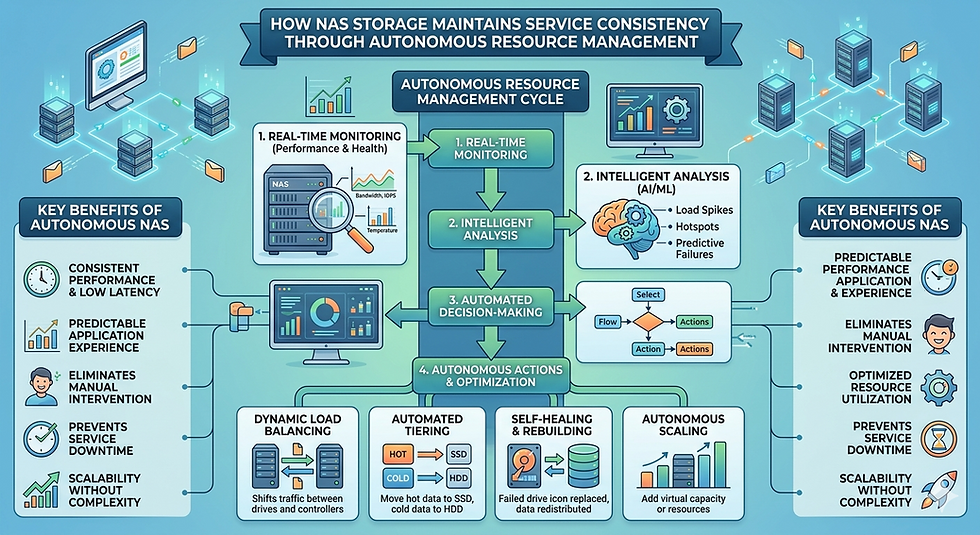
A hybrid cloud deployment marries the two. You keep your "hot" data—the files people are working on right now—on a high-performance local NAS. Meanwhile, "cold" data—old projects, backups, and archives—is automatically tiered off to the cloud.
This gives you the LAN-speed performance users expect without the cost of buying petabytes of high-performance hardware for files no one has touched in three years.
Key benefits for hybrid cloud:
Cost Efficiency: You stop paying top dollar to store archival data on premium hardware.
Scalability: You effectively have unlimited capacity via the cloud backend.
Disaster Recovery: Since a copy of your data lives in the cloud, restoring operations after a local hardware failure is significantly faster and easier.
Choosing the Right Path
There is no single "correct" way to deploy Network Attached Storage. The right choice depends entirely on your specific bottlenecks.
If your remote teams are complaining about slow file access, look at Edge NAS solutions. If your data center is drowning in unstructured data and management complexity, investigate Scale out NAS. And if you are trying to balance performance with a tight budget and massive archival needs, a hybrid model bridging NAS vs Cloud Storage is likely your best bet.
By understanding these different deployment models, IT leaders can build a storage infrastructure that doesn't just hold data, but actively helps the business run faster and more efficiently.


Comments